01
What you need
01
A Kaer Mail address, or an existing mailbox you connect over IMAP with an app password from your provider.
02
Your prices, policies and common answers in Kaer's business context, so drafts use the right facts.
How to do it
- Open Mail and choose a mailbox
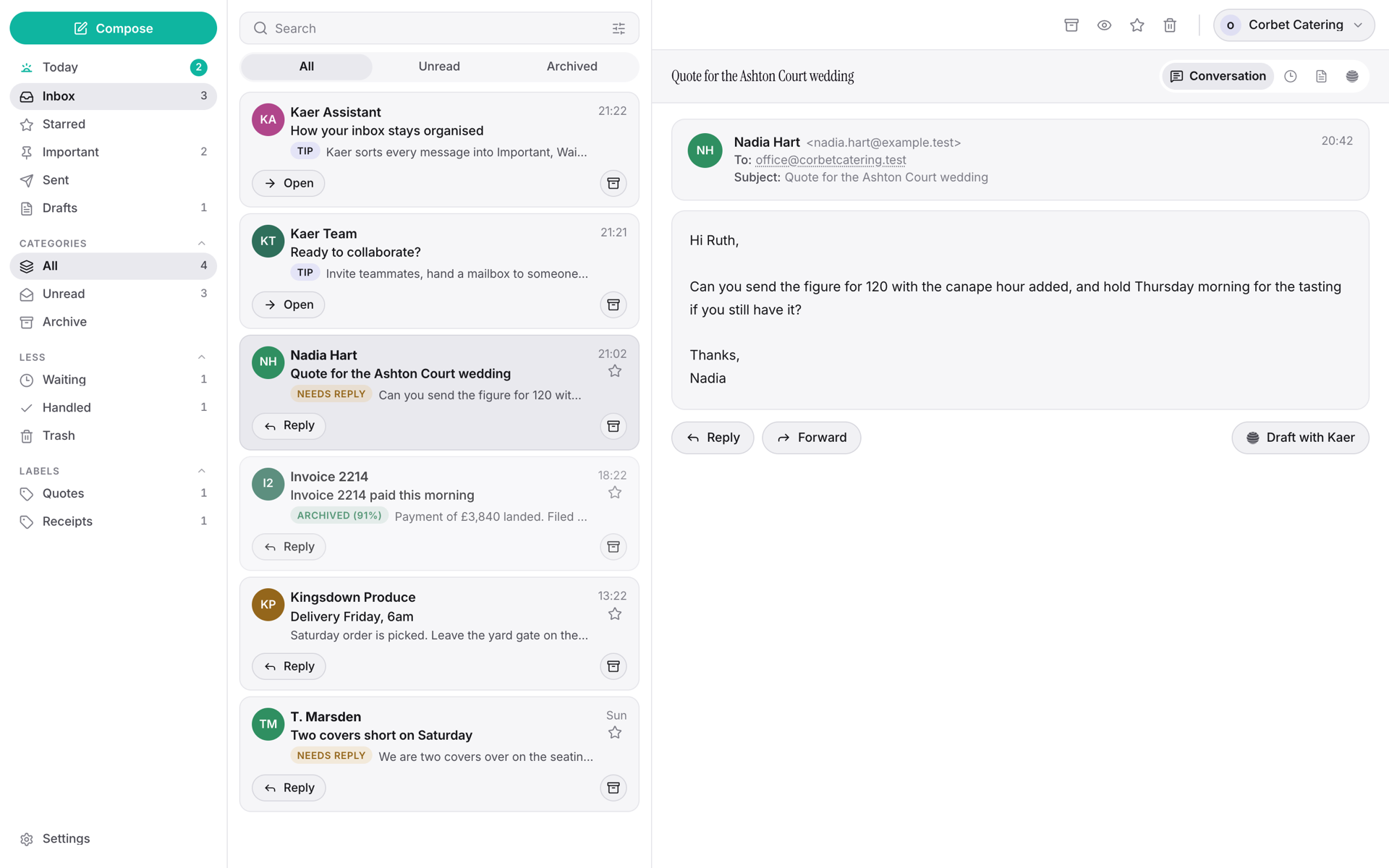
In the app, open Mail. Choose New Kaer address, or Connect a mailbox I have: enter your address and app password, then Test connection and Connect mailbox. A connected mailbox stays where it is.
- Let it sort a morning
Today shows a brief: what needs you and the drafts waiting. Check it sorted things the way you would before you let it write anything.
- Draft and approve replies
Open a thread, click Reply, then Draft with Kaer. Edit if you need to, then Approve & send, or Discard, or Regenerate.
- Choose how much runs on its own
In Settings → Mail → Triage & AI, pick Manual, Semi-auto (replies wait for your approval) or Full auto. You can turn on Auto-reply, cap Max auto-replies per hour, and set an Escalation forward address for anything Kaer shouldn't handle.
- Put it on your own domain
Settings → Mail → Domains → Add a domain. Publish the TXT record it shows with your domain provider, then click Verify now.
The parts that stay yours
02
In Full auto, replies stop at the hourly cap you set.
03
Anything Kaer shouldn't handle goes to your escalation address.
Questions
Does my email have to move to Kaer?
No. Connect your existing mailbox over IMAP and your mail stays where it is. Or take a new Kaer address; either can run on your own domain.
What does Kaer Mail cost?
Mailbox plans are on the pricing page, and some Kaer plans include an inbox.
More guides
01
How to get work done on a website with no API
02Supplier portals, booking systems, back-office tools: how Kaer works a website in its own browser, where you sign in, and where it stops for your approval.
How to chase overdue invoices without sending anything you haven't approved
03Find what's overdue, draft each reminder in your tone, and approve it before it goes. A step-by-step guide to chasing invoices with Kaer.
How to turn a spreadsheet you've outgrown into an internal tool
04Attach the spreadsheet, describe the tool, check the live preview and publish it on its own address. A step-by-step guide to building tools with Kaer.
How to put a weekly report on a schedule
05Describe the report once, run it by hand, add an approval step and put it on a schedule. A step-by-step guide to recurring work with Kaer Workflows.
Kaer Mail
06Pricing