
Delegating work to software only makes sense if the worst thing it can do is cheap. So before anything about what Kaer can do, here is the short list of things it will not do on its own, and what happens instead.
The five that stop
Five kinds of action stop and wait for a person: sending, paying, publishing, cancelling and merging. They share one property. Each one leaves your business and cannot be quietly taken back: an email is read, money moves, a page goes live, a booking is gone, code lands on the branch everyone else builds on.
You can put other actions on that list, if a step matters in your business that would not matter in most. The agent cannot take anything off it. The one thing you can loosen, and only after watching it work, is a specific routine email; payments, cancellations and publishing stay gated whatever else you automate.
What an approval looks like
An approval is not a yes or no box. It arrives with the whole thing attached, so you are deciding about the actual email, quote or change rather than a description of it.
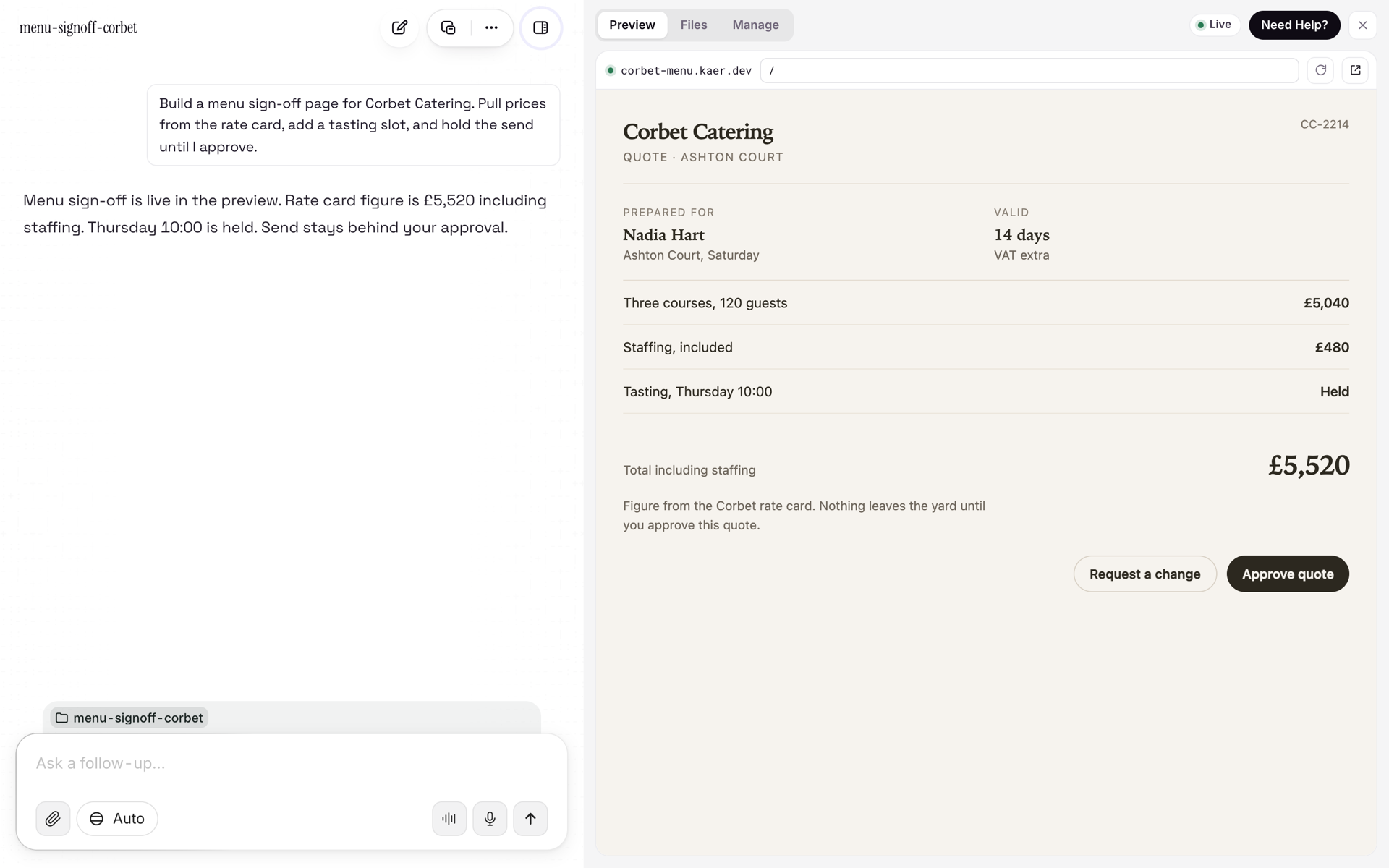
If it is right, approve it and the step runs. If it is nearly right, ask for the change on that step, and the agent redoes that part rather than starting the job again.
Email: drafted, then held
Replies are drafted and held. You read each one before it goes, and nothing leaves until you say so.
That would get tedious for the routine ones, so you can let specific routine sends go without asking once you have watched them work. The line does not move for anything involving money, cancellation or publishing. Those stay gated however much else you automate.
A browser is not a loophole
Kaer reaches some services through native connectors and the rest by signing in and using the web app in a browser of its own. The two differ in how access is granted: a connector carries explicit, revocable scopes, and a browser session lives on an isolated machine that is destroyed when the run ends.
They do not differ in whether the gates apply. A payment made in a browser stops for approval exactly like one made through an API.
Workflows keep the same rules
A workflow that runs every Monday morning obeys the same gates as a job you ask for by hand. The report can file itself; the invoice waits. Approval steps sit inside the workflow rather than being bolted on afterwards, and when a step fails it stops and tells you, with the detail attached, instead of being retried in silence.
Access you can take back
Each connection carries the narrowest scope that finishes the task, granted by you. Kaer does not escalate its own permissions or ask for admin. You can revoke access one tool at a time, and a job that needed a revoked connection stops rather than looking for another way round.
Every action the agent took and every approval a person gave is timestamped and attributable, so afterwards you can see who approved what, and when. More on the controls, including isolation and data handling, is on the security page.
The short version
- Sending, paying, publishing, cancelling and merging always wait for a person.
- You can add to that list. The agent can never take anything off it.
- Replies are drafted and held. Routine sends can be let go once you have seen them work; money, cancellation and publishing never are.
- The same gates apply in a browser and through an API, and in a scheduled workflow.
- Access is scoped, revocable per tool, and every step is on the record.
Frequently asked questions
Can Kaer send an email as me without approval?
No. Replies are drafted and held for you. Once you have seen a specific routine send work, you can let that one go without asking; anything involving money, cancellation or publishing stays gated regardless.
Which actions need a person?
By default: sending, paying, publishing, cancelling and merging. You can add others, and the agent cannot remove any. The one thing you can relax is a specific routine email, after you have seen it work; payments, cancellations and publishing stay gated regardless.
Does the approval still apply when Kaer uses a website instead of an API?
Yes. Kaer reaches some services through native connectors and others by signing in to the web app in its own browser. That changes how access is scoped, not whether the gates apply: a payment made in a browser stops for approval exactly like one made through an API.
What happens if I revoke a connection while a job is running?
Revocation is per tool and can happen at any time. A job that needed that connection stops rather than working around it, and your other connections stay intact.